
QR codes let you share an order-specific review invitation in person or on printed materials. When a customer scans the code, it opens their personalized review form.
Before you start
QR codes are available for orders when self-hosted review forms are enabled. The usual review-form eligibility and expiration settings apply. Each QR code is unique to an order. Share it only with the customer who placed that order.
Create and share a QR code
- In your WordPress dashboard, go to WooCommerce → Orders
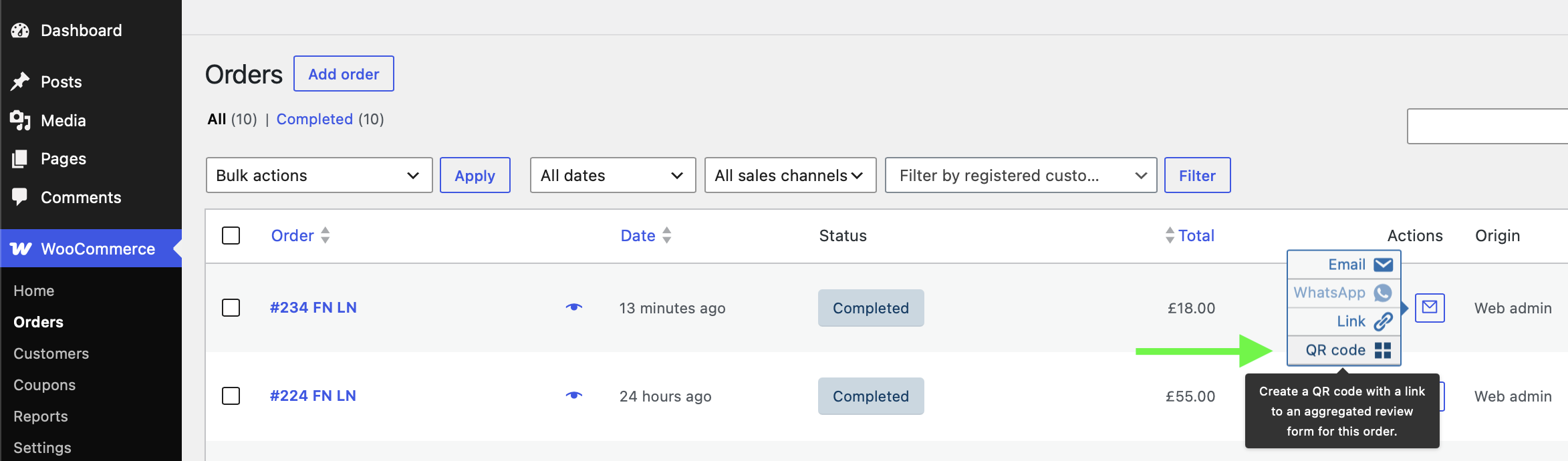
- Find the customer’s order and open its Actions menu
- On a phone, expand the order row to reveal its details and actions
- Select QR code
- In the popup, choose Copy image to copy the QR code, or Print to print it
- Share the image or printed code with the customer for that order
The QR code is generated locally by the plugin; it does not use an external QR-code service. Creating or sharing the code does not itself send an invitation.
Branding
When plugin branding is enabled, the QR image includes a small “Created with” credit and the CusRev star logo. To remove the credit, enable Remove Plugin’s Branding under Reviews → Settings → Review Extensions.
Troubleshooting
- The QR code action isn’t available: Check that self-hosted review forms are enabled and that the order has the review-invitation actions available.
- The customer can’t submit a review: Check the review-form eligibility and expiration settings for that order.
Additional information
QR Code is a registered trademark of DENSO WAVE INCORPORATED.
More questions?
We hope that this tutorial was helpful. If you have any questions about the plugin, please don't hesitate to post them on our support forum or submit a ticket for our support team (available for customers with Pro licenses).